Image Map

четвртак, 14. август 2014.

How to delete Instagram account

If you have created an account on Instagram and you are not satisfied with this app and you want to delete your account, see how you can do it.


1 Log on to the www.instagram.com


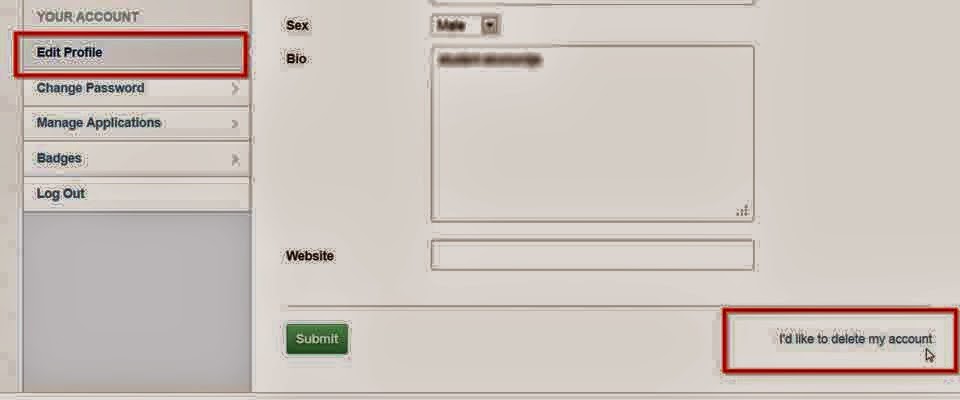
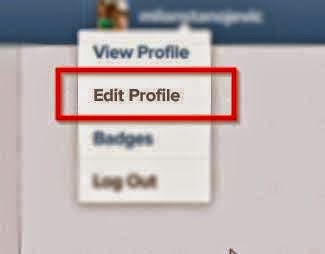
2 Click on "Edit profile"


3 Click on the link "I'd like to delete my account" located at the bottom right corner.


 4 Select the reason why you want to delete instagram and confirm your decision.

How to "smush" pictures online.

Load time of your site is one of many factors that Google uses to rank, so it is important to reduce the size of your images wherever possible.

Normally if you need a smaller profile picture or something like that,this will be useful

You can reduce the size of photos online with the help of the service Smush.it that will compress the image, where by not reduce image quality.


What is great about this service is that you can compress multiple photos at once.

Good luck smushing :)

Kako smanjiti velicinu slika online.

Vreme učitavanja vašeg sajta je jedan od mnogih faktora koji Google koristi za rangiranje, tako da je važno da se smanji veličina vaših slika gde je to moguće.

 Normalno ako vam je potrebna manja slika za profil ili nesto slicno ovo ce vam biti od koristi.

Veličinu fotografije možete smanjiti i online uz pomoć servisa Smush.it  koji će kompresovati fotografiju, pri čemu se neće smanjiti kvalitet slike.


Ono što je dobro kod ovog servisa je što možete kompresovati više fotografija odjednom.


Srecno Smushovanje :)

Kako obrisati nalog na Instagramu

Ukoliko imate nalog na Instagramu i niste zadovoljni njim ili vam vise nije potreban a zelite da ga obrisete evo jednog jako prostog nacina


1. Ulogujte se na www.instagram.com

2. Kliknite na "Edit profile"


3. Kliknite na link "i`d like to delete my account" koji se nalazi u donjem desnom uglu.

4. Izaberite razlog zbog kojeg želite da izbrišete instagram i potvrdite vašu odluku.
Related Posts Plugin for WordPress, Blogger...